---
title: "Day_06_代码作业_11-15"
author: "领学人-Angus-心内科"
date: "`r Sys.Date()`"
output:
  prettydoc::html_pretty:
    theme: cayman
    highlight: github
editor_options:
  chunk_output_type: console

---

### 1.生成数据

```{r}
df <- data.frame(
"Medical.Science"=c("clinical medicine",
"Nursing","Basic Medicine",
"pharmacy"),
"score"=c(1,2,NA,4))
suppressMessages(library(tidyverse))
df <- tibble(df)
head(df)
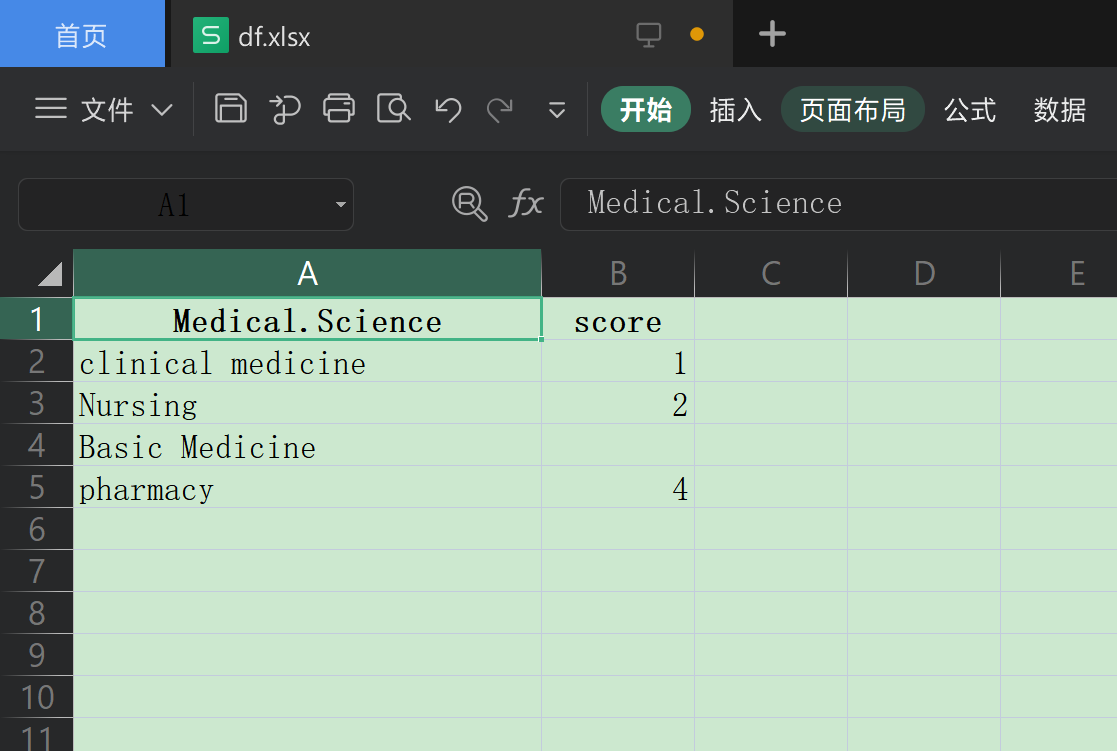
2.第11题:将data.frame转换为Excel
{r eval=FALSE} # install.packages("writexl") # install.packages("xlxs") suppressMessages(library(writexl)) write_xlsx( df, path = (fileext = "./Day_06/代码作业_11-15/df.xlsx"), col_names = TRUE, format_headers = TRUE, use_zip64 = FALSE ) # 其实这里面write.csv(df,'./df1.csv') 更加常用,哈哈,没必要追求 #复杂的xls格式 # 打开结果如下:
3.第十二题:查看数据的行列数
{r} dim(df)
4.第十三题:提取score列值大于1小于3的观测
{r} suppressMessages(library(tidyverse)) df %>% filter(score > 1 & score < 3,na.rm = TRUE) filter(df,between(df$score,1,2)) #between这个函数是包括端点的哦 filter(df,between(df$score,1,3))
5.第十四题:交换两列数据
{r} # 一种比较直观的方法: df1 <- df[,c(2,1)] head(df1) #df <- df1 # 覆盖掉就行了 # 用select()函数,可见更加方便,首推! df %>% select(score,Medical.Science) %>% head() # 也可以理解为单纯把score列提前,其它的不动 df %>% select(score,everything()) %>% head()
6.第十五题:提取score列最大值所在的行
```{r} max_val <- max(df$score,na.rm = T) df %>% filter(score==max_val) %>% head()
#以上两行代码可以合并成: df %>% filter(score==max(score,na.rm = T)) %>% head()